Manuscripta is implemented as two independent but tightly integrated applications built concurrently against a shared API contract. The Windows teacher application was built by Raphael Li and Nemo Shu. The Android student application was built by Will Stephen and Priya Bargota.
Key Features
- AI material generation (Qwen3:8b + Granite fallback)
- Hierarchical content library
- Real-time classroom dashboard
- Device pairing and management
- AI feedback generation with teacher approval
- Rich editor workflow with streaming AI, question and attachment management, and PDF export
- Classroom controls with device status, alerts, selection, and deployment tracking
- External device support for reMarkable/Kindle pairing, deployment, and per-device PDF overrides
- Response review and feedback operations with AI queue controls and response PDF export
- Android device pairing screen
- Material display
- Raise Hand help request
- Multi-channel networking (HTTP/TCP/UDP)
- Clean Architecture data and network layers
Frameworks and Libraries
Windows Teacher Application
| Component |
Technology |
Purpose |
| Backend framework |
ASP.NET Core (.NET 10.0) |
REST API, SignalR hub, business logic |
| Frontend framework |
React + Electron |
Desktop UI, backend process management |
| Internal real-time communication |
SignalR |
Bidirectional event broadcasting between backend and UI |
| Database |
SQLite via Entity Framework Core |
Local persistent storage for all content and session data |
| AI inference |
Ollama (Qwen3:8b, IBM Granite 4.0) |
On-device material generation and feedback |
| Vector database |
ChromaDB (Model: nomic-embed-text) |
RAG pipeline for source document retrieval |
| Device delivery |
rmapi, SMTP |
reMarkable and Kindle content distribution |
| Build and packaging |
Electron Forge, Squirrel |
Windows installer creation |
Android Student Application
| Component |
Technology |
Purpose |
| Language |
Java |
Primary development language |
| Local database |
Room (androidx.room 2.6.1) |
Offline-first persistent storage |
| HTTP networking |
Retrofit 2.11.0 + OkHttp 4.12.0 |
REST communication with Windows backend |
| Dependency injection |
Hilt (Dagger 2.52) |
Loose coupling across all layers |
| Architecture |
MVVM with LiveData |
Reactive UI without direct data source access |
| Testing |
JUnit, Mockito, Robolectric, MockWebServer |
Unit and integration testing |
| Coverage reporting |
JaCoCo 0.8.12 |
90% coverage enforcement via CI |
| Code style |
Checkstyle 10.12.0 |
Enforced on every pull request |
Repository Structure
The project uses a monorepo — both applications live in the same GitHub repository at raphaellith/Manuscripta under separate top-level directories. This allowed both sub-teams to share the API contract and documentation while keeping their CI/CD pipelines independent via path-based triggers.
Manuscripta/
├── android/          Android student application
│   └── app/
│       └── src/main/java/    Java source code
├── windows/          Windows teacher application
│   └── ManuscriptaTeacherApp/
│       ├── docs/         System design docs and specification
│       ├── Main/         ASP.NET Core backend
│       ├── MainTests/    Integration tests for the backend
│       └── UI/           Electron + React frontend
├── docs/             Project documentation
└── README.md
Because the Windows and Android applications were developed simultaneously by separate sub-teams, a shared API contract was established at the outset alongside detailed procedure specifications (Pairing Process Specification and Session Interaction Specification). The two main domains of backend interaction are device pairing and session management. Both workflows use a dual-socket, asynchronous approach comprising UDP for network discovery, TCP for low-latency signalling, and HTTP REST for bulk data payloads.
1. Device Pairing Process
The pairing procedure occurs entirely on the local network (LAN) to maintain operational security in a classroom setting, avoiding external authentication servers.
- Discovery: The Windows Teacher App broadcasts a UDP discovery packet on port
5913 containing its IP address, HTTP port, and TCP port. Android tablets listen for this packet to skip manual IP entry.
- Connection: Upon discovery, the Android tablet establishes a persistent TCP connection on port
5912, issuing a PAIRING_REQUEST (0x20). Simultaneously, it calls the POST /pair HTTP endpoint on port 5911 to formally register its device ID and student name.
- Acknowledgement: The Windows app completes the handshake by sending a TCP
PAIRING_ACK (0x21) and an HTTP 201 Created. Only fully paired devices are permitted to participate in sessions.
2. Session Interaction & Networking
A session manages the distribution and life-cycle of materials (like worksheets or quizzes) provided to the tablets. Instead of having tablets repeatedly poll an HTTP server for updates, the architecture uses TCP as an asynchronous event channel.
- Heartbeat Mechanism: Tablets send a TCP
STATUS_UPDATE (0x10) every 3 seconds. To maintain robust connections, if the Windows app receives no heartbeat for 10 seconds, the device is flagged as disconnected on the teacher's dashboard.
- Content Distribution: The Windows app sends a TCP
DISTRIBUTE_MATERIAL (0x05) signal. Tablets immediately perform a REST API GET /distribution/{deviceId} request to retrieve the material data (JSON payloads), and respond with a TCP DISTRIBUTE_ACK (0x12) confirming successful retrieval.
- Live Control & Help Requests: Teachers can remotely lock/unlock tablets using TCP opcodes
0x01 and 0x02, which tablet clients automatically acknowledge by modifying their status flags in their ongoing heartbeats. Students can discreetly request help, raising a TCP HAND_RAISED (0x11) signal.
- Returning Responses & Feedback: Completed quizzes and worksheets are submitted back via an HTTP
POST /responses payload. Feedback generated subsequently is delivered via the Windows client sending a TCP RETURN_FEEDBACK (0x06) message, triggering the Android client to fetch via HTTP GET /feedback/{deviceId} and confirming receipt with FEEDBACK_ACK (0x13).
Encoding of Materials
Material content is persisted and transmitted as a markdown-encoded string. The supported language is a constrained CommonMark/GitHub-Flavoured Markdown subset with defined support for headers, emphasis, lists, tables, LaTeX, code blocks, blockquotes and attachment references. Domain-specific behaviours are represented through custom markers, including embedded PDFs, centred blocks and inline question references.
The AI generation pipeline is explicitly grounded in this encoding contract. During both initial generation and selected-content modification, the backend prompt includes instructions to return content in Material Encoding format together with a condensed markdown syntax guide. For worksheet flows, the prompt additionally includes the question-draft syntax so the model can place draft questions at pedagogically appropriate points in the body of the material, rather than appending them out of context.
On material persistence, any question-draft blocks are parsed into concrete QuestionEntity records, assigned UUIDs, and rewritten in content as canonical !!! question id="..." markers. If draft parsing fails, malformed draft markers are removed and surfaced as validation warnings. After AI output is produced, the application validates markdown structure, custom marker structure, attachment references and question references, applies deterministic repairs for common structural issues, and returns unresolved problems as line-level warnings for manual correction in the editor.
Embedded questions are transported and consumed at runtime through a distribution bundle model. When a tablet receives GET /distribution/{deviceId}, the payload contains separate arrays of MaterialEntity and QuestionEntity, so question content is transmitted as first-class entities rather than inlined JSON fragments inside material content. The material body therefore carries references (question markers) while the concrete question objects are resolved from the accompanying questions array. Windows assigns IDs for materials and questions, and Android preserves them, ensuring stable marker-to-entity linkage across edits, sync, and rendering. Student answers are then submitted via POST /responses as ResponseEntity records that reference those question IDs.
Communication Flow
sequenceDiagram
participant A as Android Tablet
participant W as Windows Teacher App
Note over A,W: 1. Device Discovery & Pairing
W->>A: UDP Broadcast (Port 5913): Server IP & Ports
A->>W: TCP Connect & PAIRING_REQUEST (0x20)
A->>W: HTTP POST /pair
W-->>A: TCP PAIRING_ACK (0x21)
W-->>A: HTTP 201 Created
Note over A,W: 2. Session Interaction & Heartbeat
loop Every 3s
A->>W: TCP STATUS_UPDATE (0x10)
end
Note over A,W: 3. Material Distribution
W->>A: TCP DISTRIBUTE_MATERIAL (0x05)
A->>W: HTTP GET /distribution/{deviceId}
W-->>A: Material JSON Payload
A->>W: TCP DISTRIBUTE_ACK (0x12)
Note over A,W: 4. Student Response & Feedback
A->>W: HTTP POST /responses
W-->>A: HTTP 201 Created
W->>A: TCP RETURN_FEEDBACK (0x06)
A->>W: HTTP GET /feedback/{deviceId}
W-->>A: Feedback JSON
A->>W: TCP FEEDBACK_ACK (0x13)
External Device Delivery (reMarkable & Kindle)
In addition to the Android student application, Manuscripta supports delivering materials directly to E-ink devices such as the reMarkable tablet and Amazon Kindle. This ensures compatibility with existing hardware in schools.
- reMarkable: Delivery is handled via
rmapi, integrating directly with the reMarkable cloud to upload generated worksheets and quizzes as PDFs.
- Kindle: Materials are sent using SMTP via the Kindle "Send to Kindle" email service.
Windows Teacher Application
Built by Raphael Li and Nemo Shu
Application Startup and Process Management
The Windows application consists of a .NET 10.0 ASP.NET Core backend and a React/Electron frontend. The frontend is responsible for spawning, monitoring and terminating the backend as a child process on startup using Node.js child_process.spawn. The backend is published as a self-contained win-x64 executable bundled inside the Electron application, meaning the teacher installs and runs a single application with no separate setup required. If the backend crashes, the frontend detects this via health checks and restarts it automatically with exponential backoff. Dynamic port allocation ensures startup succeeds even if default ports are unavailable.
Security is enforced through strict Content Security Policy headers, a preload script using contextBridge, and no Node.js access in the renderer process. File attachments are stored using UUID-based naming in AppData\ManuscriptaTeacherApp\Attachments, with IPC handlers managing file picking, storage, retrieval and deletion.
Content Library
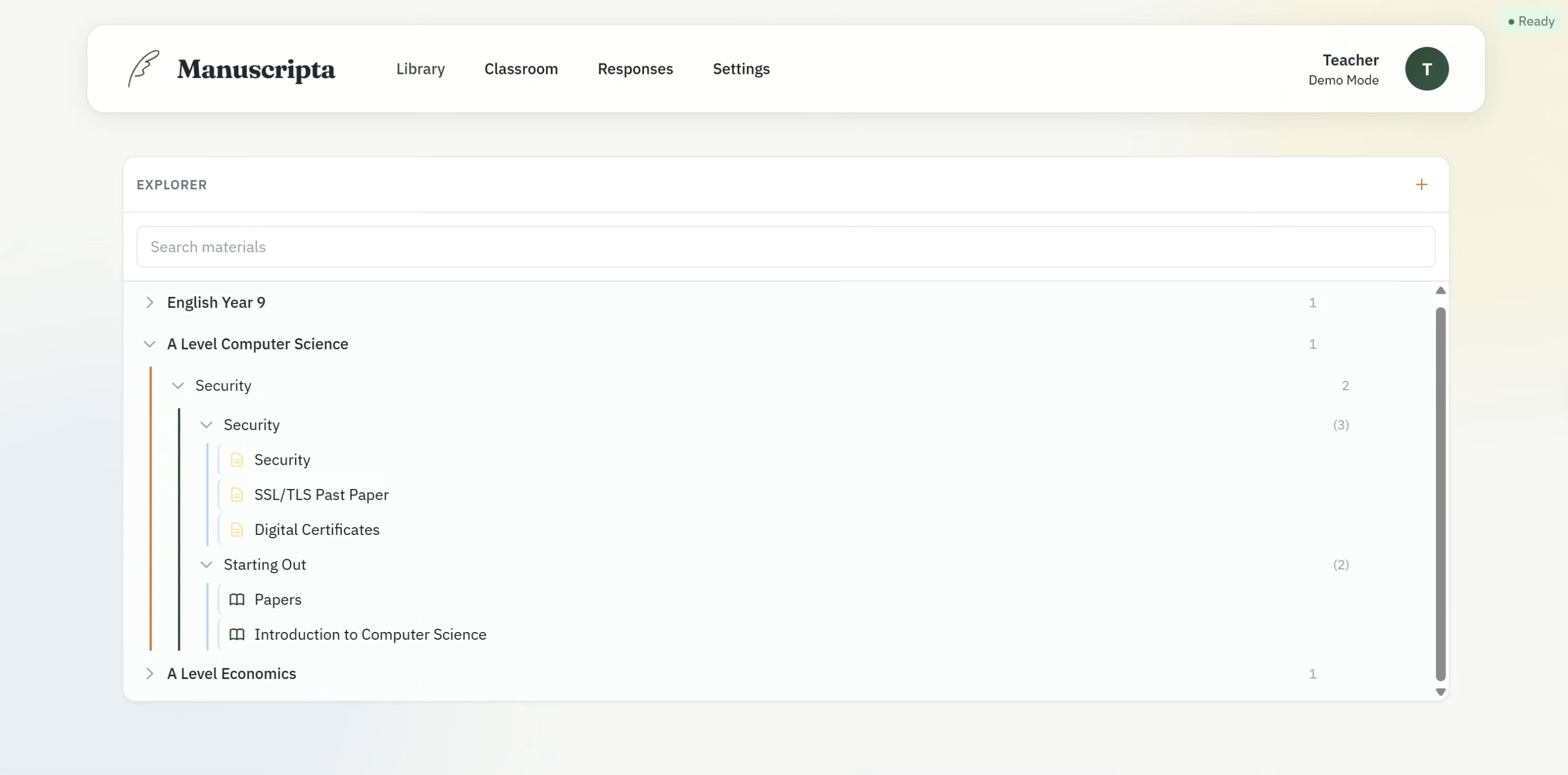
The Library view provides a hierarchical explorer of all teaching content organised as Unit Collections, Units, Lessons and Materials. Teachers can expand and collapse each level, search across all materials using a global search bar, and create new content at any level. Material type is indicated by icon — worksheets and quizzes are visually distinguished. This hierarchy was added directly in response to client feedback captured in C7.
Classroom Management
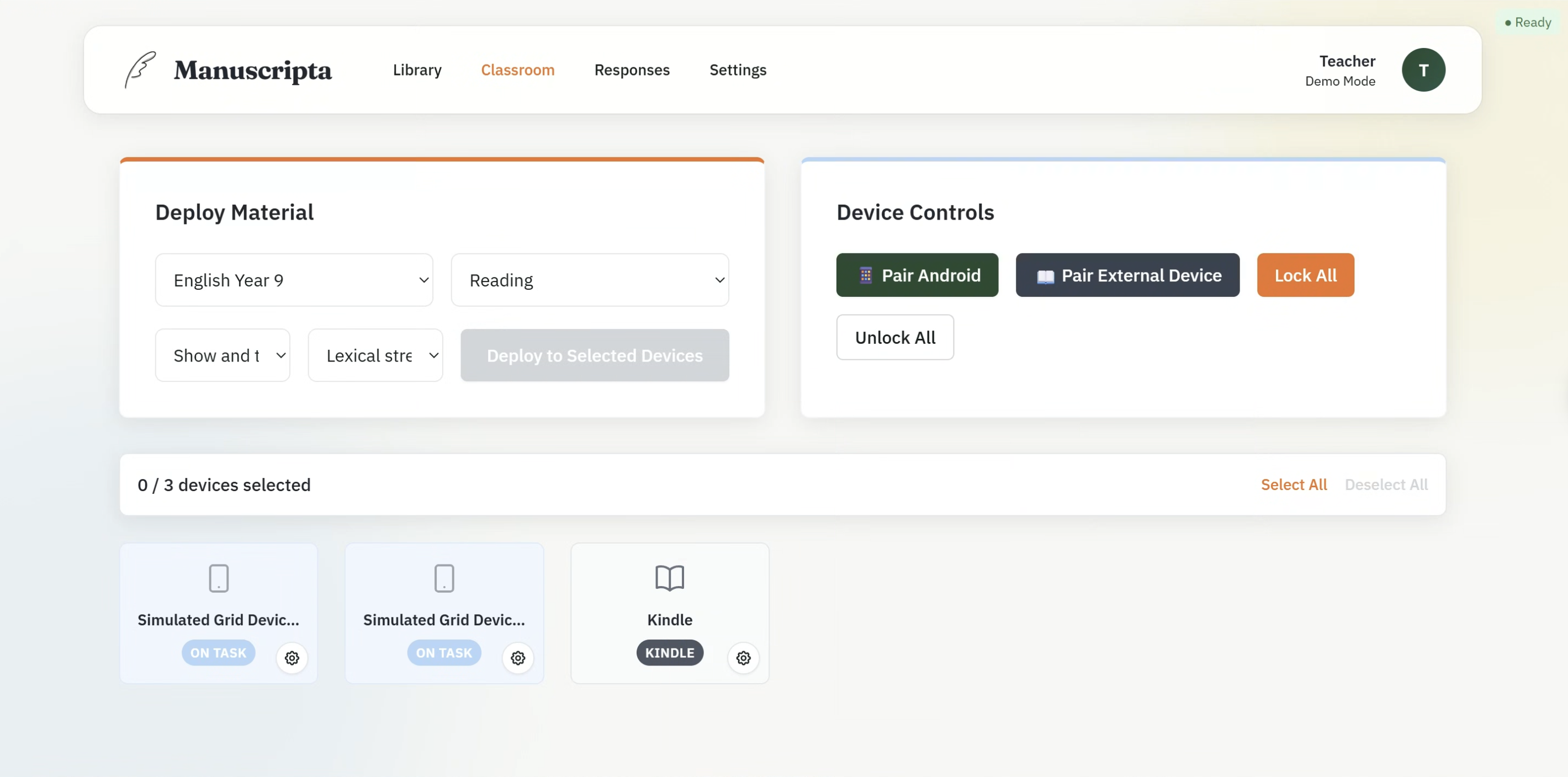
The Classroom view is divided into two panels. The Deploy Material panel allows the teacher to select a unit, lesson, material and accessibility options from cascading dropdowns, then deploy to all selected devices simultaneously. The Device Controls panel provides one-click Lock All and Unlock All buttons, and separate pairing flows for Android tablets via TCP and external devices such as Kindle via email.
The connected device grid shows each paired device as a card displaying its name and connection status — ON TASK, NEEDS HELP or DISCONNECTED. The Kindle device is shown with a distinct label, reflecting the parallel delivery workflow validated with Dr Atia Rafiq.
Responses and AI Feedback
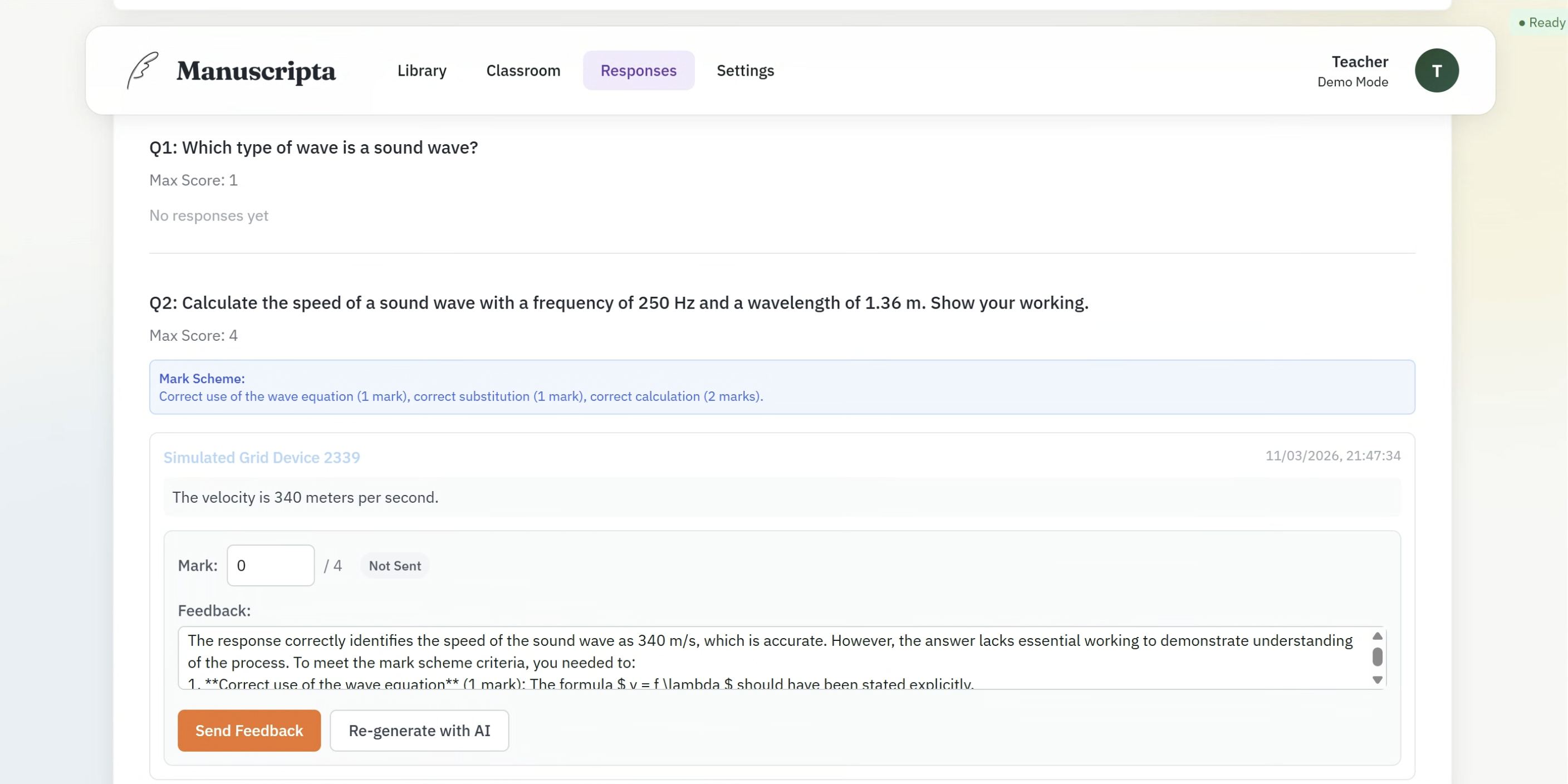
The Responses view shows each question from the deployed material alongside all student responses received. For each response the teacher sees the student's answer, the AI-generated mark scheme, a mark input field, and an AI-generated feedback comment produced by IBM Granite 4.0. The teacher can edit the mark, edit the feedback text, send it directly to the student's device, or regenerate the feedback using the Re-generate with AI button. This implements the teacher oversight requirement — AI feedback is always subject to teacher review before it reaches the student.
Real-Time Communication via SignalR
The backend exposes a SignalR hub at /TeacherPortalHub on port 5910, providing real-time bidirectional communication between the backend and the React frontend. The frontend subscribes to hub events and updates the UI reactively without polling.
A dedicated HubEventBridge hosted service bridges low-level TCP network events to high-level SignalR broadcasts. It subscribes to eight event types and converts them to Clients.All.SendAsync() broadcasts, implementing a clean pub/sub pattern that keeps the TCP layer decoupled from the UI layer. Key events include UpdateDeviceStatus, HandRaised, DistributionFailed, RefreshResponses and feedback state transitions from PROVISIONAL to READY to DELIVERED.
AI Content Generation Pipeline
Material generation uses a two-model pipeline running entirely on the teacher's laptop via Ollama. Qwen3:8b is the primary model for generating formatted worksheets and quizzes. IBM Granite 4.0 was originally intended as the primary model but was moved to fallback after testing showed it struggled to produce correctly structured output, particularly for question-based materials. Granite is retained for lower-resource hardware and is used as the primary model for feedback generation, where its performance is sufficient for the smaller task.
For source document processing, ChromaDB implements a standard RAG pipeline. Documents are chunked into 512-token segments with 64-token overlap, embedded using the nomic-embed-text model via Ollama, and stored in ChromaDB with metadata. During material generation, the top five most semantically relevant chunks are retrieved and injected into the prompt, solving the context window limitation that makes large documents such as textbooks unusable when passed whole to the model.
Runtime dependencies including Ollama, ChromaDB and rmapi are managed by a centralised RuntimeDependencyManager system built on an abstract base class. Each dependency subclasses from this base, meaning new tools can be added without duplicating detection and installation logic.
Pseudocode: Material Generation
FUNCTION GenerateMaterial(description, readingAge, materialType, unitCollectionId, sourceDocIds):

    // Model selection
    selectedModel = "qwen3:8b"
    IF NOT CanGenerateWithModel(selectedModel):
        UnloadModel("qwen3:8b")
        selectedModel = "granite4"
        IF NOT EnsureModelReady(selectedModel):
            THROW "No models available"

    // RAG context retrieval
    descriptionEmbedding = Ollama.Embed("nomic-embed-text", description)
    relevantChunks = ChromaDB.Query(
        vector = descriptionEmbedding,
        filters = {UnitCollectionId, SourceDocumentIds},
        topK = 5
    )

    // Prompt construction
    prompt = BuildPrompt(description, readingAge, materialType, relevantChunks)

    // LLM inference
    response = Ollama.Chat(selectedModel, prompt, temperature=0.7, timeout=300s)
    generatedContent = response.content

    // Validation and iterative refinement (fallback model only, max 3 iterations)
    IF selectedModel == "granite4":
        FOR iteration IN 1..3:
            errors = ValidateOutput(generatedContent)
            IF no errors: BREAK
            generatedContent = Ollama.Chat(selectedModel, RefinementPrompt(errors))

    // Deterministic fixes
    finalContent = ApplyFixes(generatedContent)  // close code blocks, normalise headers, fix markers

    // Question extraction for worksheets
    IF materialType == WORKSHEET:
        finalContent, questionIds = ExtractQuestionsFromDrafts(finalContent)

    RETURN finalContent, questionIds

END FUNCTION
Pseudocode: Feedback Generation
FUNCTION GenerateFeedbackAsync(response):

    question = FetchQuestion(response.questionId)
    IF question.markScheme == null: RETURN null

    EnsureModelReady("granite4")

    prompt = BuildFeedbackPrompt(question.text, response.answerText, question.markScheme)
    feedbackText = Ollama.Chat("granite4", prompt, temperature=0.5)

    feedback = CreateFeedback(feedbackText, status=PROVISIONAL)
    SignalR.Broadcast("OnFeedbackGenerated", feedbackId, responseId)

    RETURN feedbackId

END FUNCTION
Android Student Application
Built by Priya Bargota and Will Stephen
The Android application is written in Java and follows Clean Architecture with three strictly separated layers. Dependency injection is handled by Hilt throughout. The data and network layers achieve 90% instruction coverage, validated by JaCoCo. A number of classes are excluded from coverage reporting because JaCoCo either counted them as generated build files or could not detect that they were being tested.
View JaCoCo excluded classes
- Android-generated resources:
R.class, BuildConfig, Manifest, databinding
- Hilt dependency injection artefacts:
*_Factory, *_MembersInjector, Hilt_*, *_Impl, *_GeneratedInjector
- UI Activities and Fragments:
MainActivity, PairingActivity, ReadingFragment, QuizFragment, WorksheetFragment, FeedbackFragment, TeacherFeedbackFragment
- Rendering components:
MarkdownRenderer, QuestionBlockRenderer, AttachmentImageLoader, custom Views
- Network and connection managers:
TcpSocketManager, HeartbeatManager, PairingManager, ConnectionManager, MulticastLockManager
- Application entry points:
ManuscriptaApplication, ManuscriptaDatabase, DatabaseModule
Device Pairing Screen
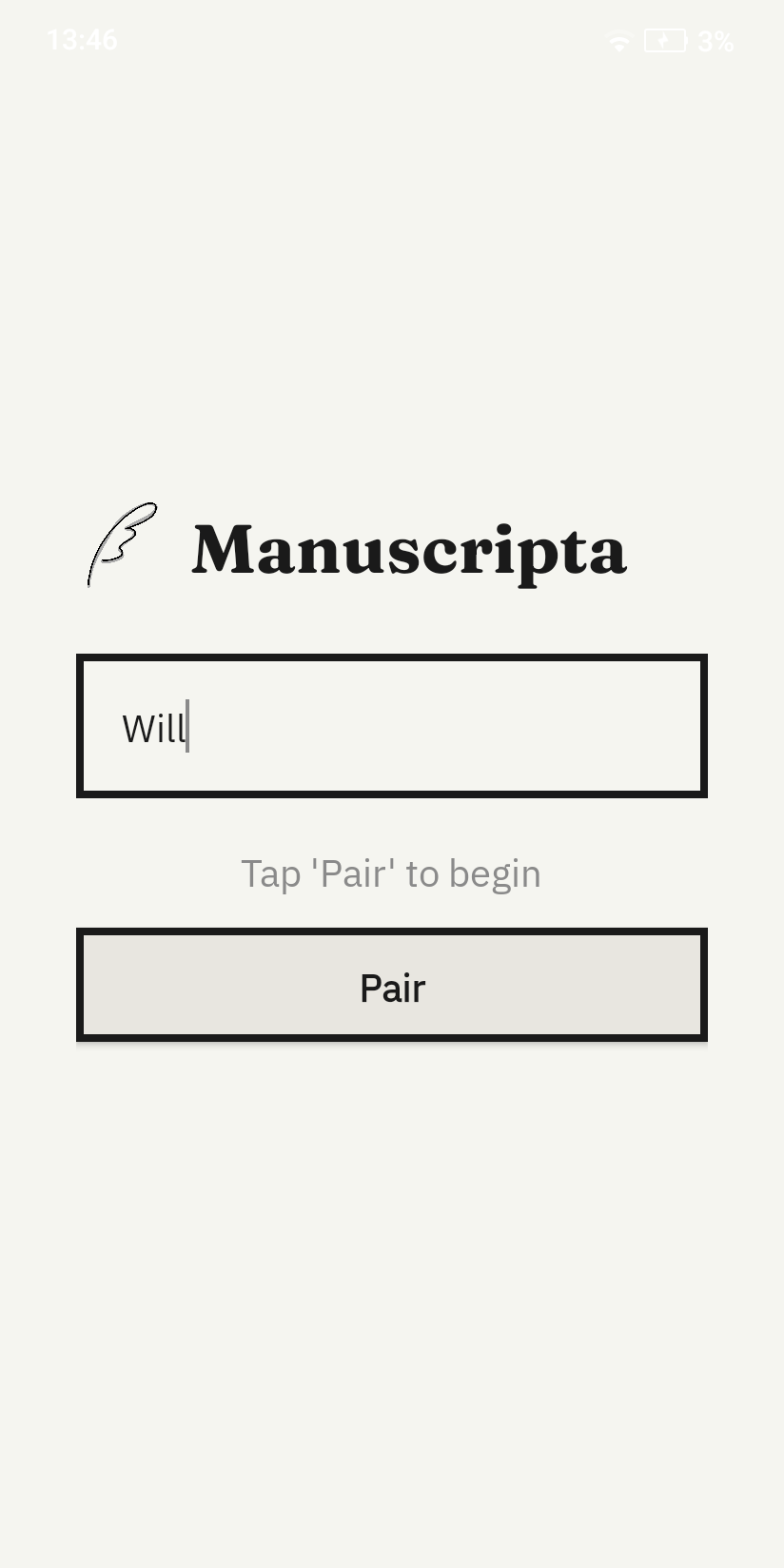
On first launch the student enters their name and taps Pair. The application broadcasts a UDP discovery packet on port 5913 to locate the teacher's Windows application on the local network without requiring manual IP configuration. Once the server responds, a TCP pairing handshake is completed on port 5912 and the device is registered. The screen is deliberately minimal — a single text field and one button — reflecting the principle of reducing cognitive load established in C1.
Worksheet View
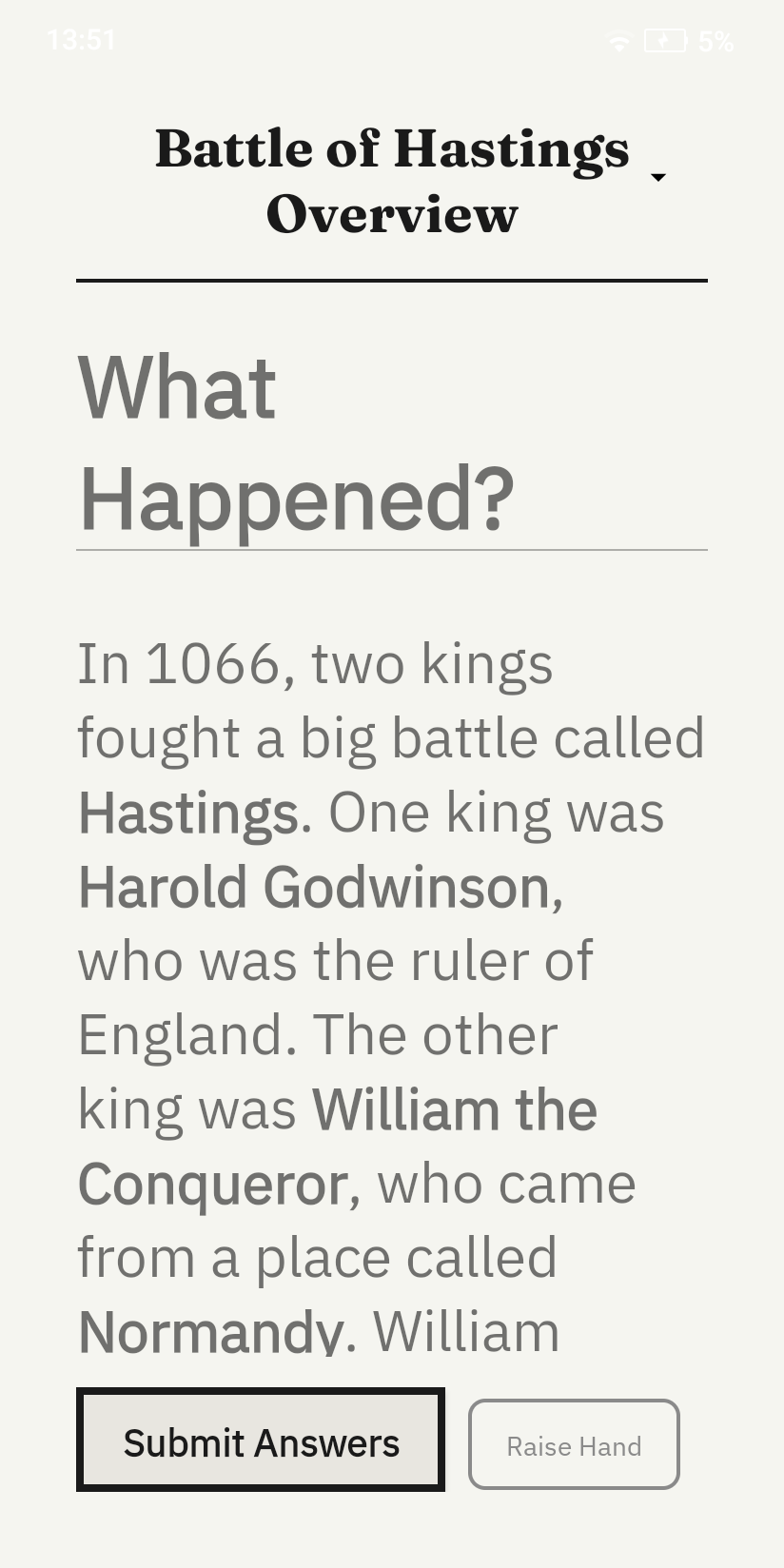
Once paired and a material is deployed, the student sees the worksheet displayed in large high-contrast monochromatic text optimised for E-ink rendering. Typography is set at a size appropriate for the target age group with generous line spacing to support students with reading difficulties. A persistent Raise Hand button sits at the bottom right of every content screen, allowing the student to send a discreet help request to the teacher dashboard without interrupting their work.
Quiz View
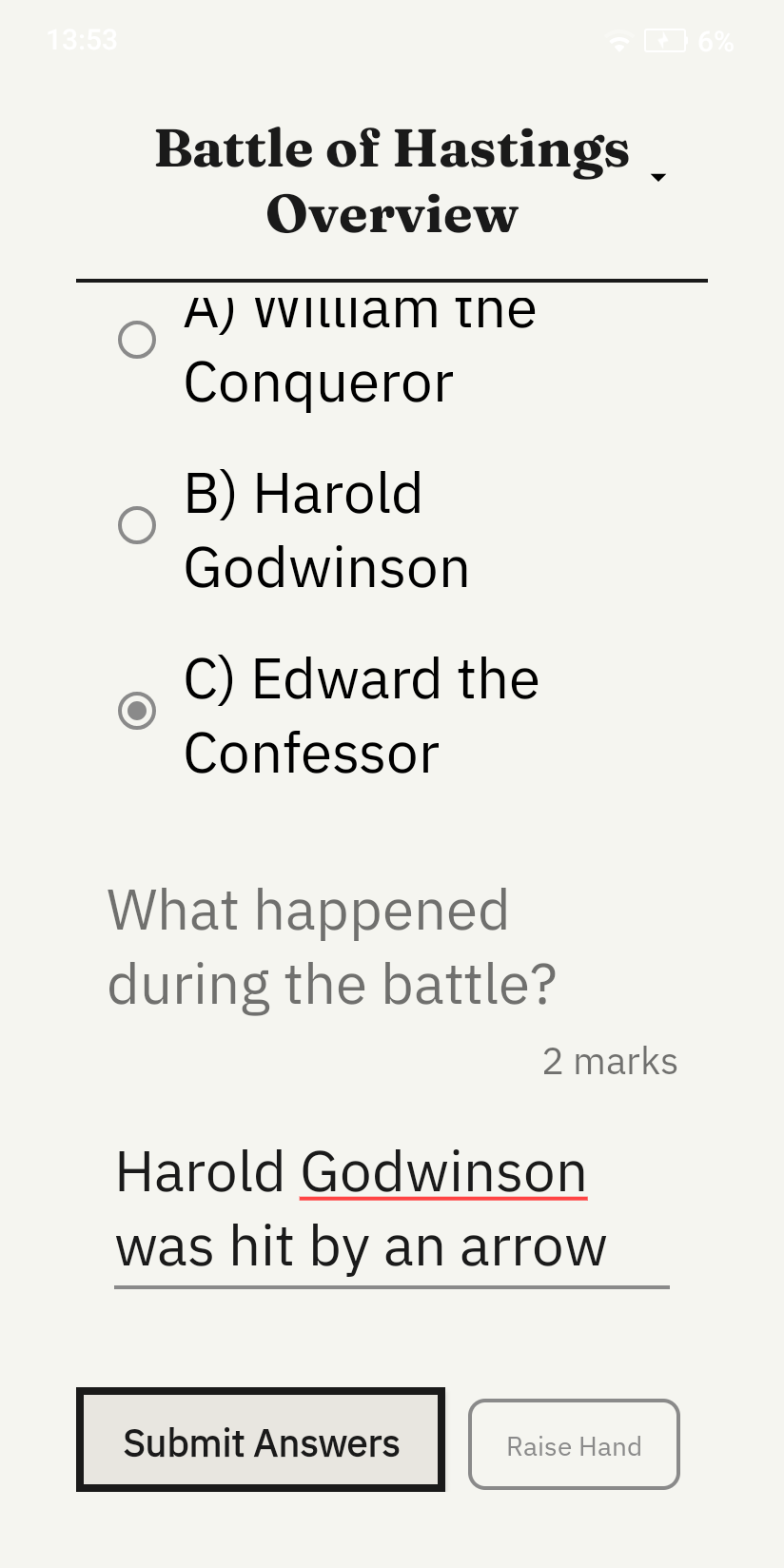
The quiz view displays a reading passage followed by a question and an answer input field. The student types their response and submits it via HTTP POST to port 5911, where it appears in the teacher's Responses view alongside AI-generated feedback from IBM Granite 4.0.
Clean Architecture Implementation
The data layer contains Room entities, DAOs and Retrofit DTOs. Entities are immutable with a single constructor, making them suitable only for Room persistence and preventing accidental mutation. The domain layer contains corresponding domain models with convenience constructors and input validation that throws immediately on invalid state. Bidirectional mappers convert between entities and domain models, keeping Room annotations entirely out of business logic. The presentation layer uses ViewModels and LiveData, ensuring the UI reacts to state changes without directly accessing data sources.
CI/CD Pipeline
The Android application uses GitHub Actions for continuous integration. The workflow triggers on pull requests to any path within android/ and runs two jobs sequentially. The first job runs Checkstyle to enforce code style across the entire codebase. The second job runs the full JaCoCo test suite enforcing 90% unit test coverage — the build fails if coverage drops below this threshold. Coverage reports are uploaded as artifacts and posted as comments on pull requests automatically.
Similarly, a CI/CD pipeline was implemented for the Windows application to automate backend builds and tests, as well as packaging through GitHub Actions using Electron Forge.
Key Implementation Decisions
| Decision |
Rationale |
| Electron manages .NET backend lifecycle |
Single executable deployment — teachers install one application, backend starts automatically with no separate setup |
| Qwen3:8b as primary, Granite as fallback |
Granite struggled with correctly formatted multi-question materials during testing; Qwen3 produces better structured output at reasonable speed |
| Per-material TCP acknowledgement |
Allows the Windows dashboard to display exact distribution state per material rather than a single batch confirmation |
| HeartbeatManager owns all TCP dispatch |
Prevents direct coupling between the network layer and repositories, single source of truth for all TCP messages |
| Immutable Room entities |
Prevents accidental mutations during persistence, enforces clean separation from domain models |
| 90% Android unit test coverage enforced by CI |
Ensures every data and network layer component is independently verifiable, supporting the clean architecture goal |
Use of AI Agents in Development
Windows Application
The Windows application follows a specification-anchored development workflow in which formal specifications and the codebase are treated as co-equal sources of truth. Specifications are intentionally drafted in a legalistic style, with explicit structure and dense cross-reference patterns, so that each document is internally coherent and can be interpreted with minimal ambiguity. In practice, these specifications serve two roles: they function as executable intent for coding agents, and they provide a stable benchmark for review agents during pull request evaluation. Generated code is encouraged to include specification point references, improving traceability between implementation decisions and documented requirements.
Google Antigravity and GitHub Copilot were the two primary agent harnesses used throughout implementation. Antigravity's planning workflow proved especially effective at translating high-level requirements into concrete implementation steps and exposing underspecified or easily misread clauses before code generation. However, strict usage limits on higher-capability models reduced its availability during sustained development, so GitHub Copilot agents were frequently used as a practical fallback, typically with more explicit manual prompting. To preserve consistency across both harnesses, we defined an AI Coding Constitution requiring agents to prioritise specification compliance and to propose specification amendments only when explicitly authorised. A condensed version of this constitution was embedded directly in agent instructions.
GitHub Copilot Review Agents were also used periodically to review pull requests. In early iterations, we observed a recurring tendency for review agents to recommend changing specifications to accommodate non-compliant code, which we interpret as an optimisation towards the lowest-effort resolution path. In response, we clarified coding-agent and review-agent responsibilities in the AI Coding Constitution and reinforced these constraints in review instructions, so that specification changes are suggested only when no proportionate implementation-level remedy is viable.
In summary, AI agents were integrated as disciplined contributors within a specification-first engineering process rather than as autonomous code generators. Their strongest value came from plan synthesis, consistency checking, and review acceleration, while constitutional guardrails were essential to keep optimisation pressure aligned with documented intent. This combination enabled faster iteration without weakening requirement fidelity, and it established a repeatable workflow for specification-driven AI-assisted development.
Case Study: Frontend Workflow Specifications Section 4C (Editor Modal)
We present an example of our specification style. Section 4C was especially useful for AI agents because it decomposed one UI feature into enforceable obligations with clear sequencing and cross-references. Instead of abstract guidance, the specification defines concrete behavioural rules for autosave timing, streaming AI interactions, validation display, question editing constraints, attachment lifecycle management, and orphan clean-up. For coding agents, this reduced ambiguity during implementation. For review agents, the numbered clauses provided a point-by-point compliance checklist, making it easier to identify behavioural regressions and to justify comments against explicit intent.
Show exact text of FrontendWorkflowSpecifications Section 4C (collapsed by default)
Section 4C - Editor Modal
(1) Core Functionalities
The front end shall provide a uniform editor modal for editing all types of materials on a what-you-see-is-what-you-get basis. It shall support —
(a) rendering and editing of all language features specified in the Material Encoding Specification.
(b) [Deleted.]
(c) rendering, insertion, editing, relocation and deletion of embedded questions.
(d) rendering, insertion, relocation and deletion of PDF, PNG and JPEG attachments.
(2) Additional Functionalities
The editor modal shall provide means through which the user can —
(a) invoke the AI assistant to make changes to the material, by selecting the locations of the content they want to modify, and describing the changes they want to make. When invoking the AI assistant —
(i) the frontend shall capture the selected content and the user's instruction.
(ii) the frontend shall invoke ModifyContent (NetworkingAPISpec Section 1(1)(i)(iv)) via TeacherPortalHub, passing the material's id, materialType, title, readingAge, and actualAge alongside the selected content and instruction.
(iii) on receiving the generation result, the frontend shall replace the user's selection in the editor with the content. If the result contains validation warnings, the frontend shall display them as specified in Section 4C(7).
(iv) Whilst the modification is in progress, the frontend shall display a streaming generation view in accordance with Section 4B(2)(a1), showing the AI's chain-of-thought and the progressively generated replacement content.
(v) The streaming generation view for content modification shall not replace the user's existing content until the final GenerationResult is received. An interim preview may be shown adjacent to or overlaid on the selected content.
(b) modify the reading age and actual age metadata of the material.
(b1) modify the per-material PDF export settings — line pattern type, line spacing preset, and font size preset. The frontend shall display a description informing the user that these settings override the global defaults for this material, but may in turn be overridden by per-device settings configured on external devices. This shall be provided in means of dropdowns, and each dropdown shall —
(i) include a "Default" option that maps to null (i.e., the global default from PdfExportSettingsEntity is used), and display the current global default value for the teacher's reference (e.g., "Default (Ruled)", "Default (Medium)");
(ii) include options for each enum value of the respective type (LinePatternType, LineSpacingPreset, FontSizePreset);
(iii) display "Default (...)" when the per-material override is null;
(iv) when the user selects a specific value, set it as a per-material override; and
(v) be auto-saved with the existing 1-second debounce mechanism like other material properties.
(c) undo and redo changes to the material.
(2A) LaTeX Formatting
The frontend shall disable rich text formatting (bold, italic, underline) in paragraphs containing inline or block LaTeX nodes. When a LaTeX node is inserted into a paragraph, any existing formatting marks in that paragraph shall be removed.
[Explanatory Note: Pursuitant to Material Conversion Specifications, Section 3A(6)(a), LaTeX and markdown formatting may not coexist in the same paragraph.]
(3) Saving Content
The editor modal shall —
(a) automatically save any changes to the material (not including embedded questions) by calling the appropriate update endpoint, as specified in Section 1(1)(d)(ii) of the Networking API Specification, at most one second after each change.
(a1) strip any syntax or tags that is not permitted per Material Encoding Specification Section 1(4) from the material content before saving, preserving only the visible text content within such tags. This includes —
(i) hyperlinks.
(b) provide a "save" button when creating or editing an embedded question. When it is clicked —
(i) in the case of a question whose ID is known by a question reference defined in Section 4(4) of the Material Encoding Specification, update the question entity by calling the appropriate update endpoint in Section 1(1)(d1)(ii) of the Networking API Specification.
(ii) in the case of a question whose ID has not been assigned, create the question entity using the appropriate create endpoint in Section 1(1)(d1)(i) of the Networking API Specification, obtain the Guid generated, and create an appropriate question reference using that Guid.
(b1) only enable the button specified in subsection (b) when —
(i) in the case of editing an existing question, there has been a change; and
(ii) all mandatory fields of the question, as defined in the Validation Rules, have been filled.
(c) provide a delete button for embedded questions. When it is clicked —
(i) [DELETED]
(ii) remove the question reference in the material.
However, this button shall not be provided when the material is a poll. [Explanatory note: this is because polls must have exactly one multiple choice question]
(d) not allow the user to delete questions through any other means than the delete button specified in paragraph (c).
(3A) Editing Questions
The frontend shall —
(a) collect the following information regarding the question the user wishes to edit:
(i) the question type, per Section 2B(1)(b) of the Validation Rules;
(ii) the question text, per Section 2B(1)(c) of the Validation Rules; and
(iii) an optional maximum score, per Section 2B(2)(c) of the Validation Rules.
(b) in the case of a multiple choice question, collect the following additional information:
(i) the options, per Section 2B(2)(a) of the Validation Rules;
(ii) the correct option, per Section 2B(2)(b) of the Validation Rules;
and clearly indicate that the correct field is optional, and by selecting an option, the user indicates that automarking should be enabled for that question.
(c) in the case of a short answer question, collect whether the user wishes to enable automarking for that question, and if so, collect the means by which the answer should be marked —
(i) in the case of exact match, collect the expected answer, and subsequently store that as CorrectAnswer per Section 2B(2)(b) of the Validation Rules when saved; or
(ii) in the case of AI-marking, collect a mark scheme, and subsequently store that as MarkScheme per Section 2E(1)(a) of the Additional Validation Rules when saved.
(4) Handling attachments
The editor modal shall —
(a) provide an "attach" button adding attachments to the material. When it is clicked —
(i) prompt the user to upload an attachment file.
(ii) create an attachment entity using the uploaded file's base name and extension, by calling Task CreateAttachment(AttachmentEntity newAttachmentEntity), as defined in Section 1(1)(l)(i) of the Networking API Specification.
(iii) create and save a copy of the uploaded attachment file to the directory %AppData%\ManuscriptaTeacherApp\Attachments. This copy's file base name must match the UUID of the attachment entity created in (ii). Its file extension must match that of the attachment file originally uploaded in (i).
(iv) insert the attachment into the material at the point indicated by the caret's current position.
(a1) when the attachment entity is successfully created by the virtue of subparagraph (a)(ii), but the copy of the file cannot be saved as suggested by subparagraph (a)(iii), remove the attachment entity created in (ii) by calling the deletion endpoint specified in Section 1(1)(l)(iii) of the Networking API Specification.
(b) provide a "delete" button for attachments. When it is clicked —
(i) [DELETED]
(ii) remove the attachment reference in the material.
(c) not allow the user to delete attachments through any other means than the delete button specified in paragraph (b).
(d) support —
(i) drag-and-drop of attachments, of all supported types, into the editor modal.
(ii) copy-paste of images into the editor modal. These images may be introduced along with text.
Attachments added in a manner specified in this paragraph shall be handled in the same manner as attachments added through the "attach" button, as specified in paragraphs (a)(ii-iv) and (a1).
(5) Initiation of Orphan Removal on Entry or Exit
The frontend shall, when the editor modal is entered or exited —
(a) retrieve all attachments and questions associated with the material, by calling Task<List<AttachmentEntity>> GetAttachmentsUnderMaterial(Guid materialId) and Task<List<QuestionEntity>> GetQuestionsUnderMaterial(Guid materialId), as defined in Section 1(1)(l)(ii) and Section 1(1)(d)(ii) of the Networking API Specification.
(b) identify all attachments and questions that are not referenced in the material, and —
(i) delete such attachment entity(ies) using the deletion endpoint specified in Section 1(1)(l)(iii) of the Networking API Specification, and delete the copy(ies) of corresponding attachment file(s) from the data directory.
(ii) delete such question(s) using the deletion endpoint specified in Section 1(1)(d1)(iv) of the Networking API Specification.
(6) Initiation of Orphan Removal on Discovery of Orphaned Attachment Entities
The frontend shall, on discovery of an attachment entity whose corresponding attachment file does not exist in the data directory when attempting to render the attachment —
(a) remove any attachment reference which references such attachment entity.
(b) delete such attachment entity using the deletion endpoint specified in Section 1(1)(l)(iii) of the Networking API Specification.
(7) Displaying Validation Warnings
When the editor modal receives content with validation warnings (per GenAISpec Section 3G) —
(a) the frontend shall display a warning banner indicating issues require attention.
(b) the frontend shall highlight or annotate the affected lines where line numbers are available.
(c) the frontend shall provide a list view of all warnings with descriptions.
Android Application
The Android sub-team adopted a broadly similar specification-anchored workflow. All agent interactions were grounded in the shared /docs directory, which served as the single source of project context across both sub-teams. Each agent harness that interacted with the Android codebase — whether Antigravity, GitHub Copilot, or Claude Code — was configured with instruction files (claude.md, .github/copilot-instructions.md, and equivalent) that directed it to read the documentation directory on startup and gather project context before generating any code. These instruction files also contained the directory layout, coding standards (including Checkstyle configuration), and testing methodologies — ensuring that agents operated within the same constraints applied to human contributors.
Google Antigravity, GitHub Copilot, and Claude Code were used throughout implementation. All generated code was manually reviewed and validated by Will, with one exception: the Android UI layer (Activities, Fragments, and rendering components) received less rigorous manual oversight due to time constraints — a trade-off discussed further under AI Agent Limitations below.
Android Copilot Instructions
Below is the content of the .github/copilot-instructions.md file used by the GitHub Copilot agents on the Android sub-team. Note that this file was not substantially updated towards the final stages of the project, as the team shifted predominantly towards using Claude Code over Copilot.
Show exact text of Android Copilot Instructions
# Manuscripta Android Client - Copilot Instructions (Cloud)

## Context Gathering (MANDATORY FIRST STEP)

Before any implementation work, read relevant documentation in `/docs/`:

### Core Documentation
| Document | Description | Authority |
|----------|-------------|-----------|
| `Project Specification.md` | Requirements referenced as `SECx` (e.g., `MAT1`, `CON2A`) | Requirements source |
| `API Contract.md` | HTTP/TCP/UDP protocols, binary message formats, data models | Network implementation |
| `Validation Rules.md` | Entity validation, field constraints, ID generation policy | Data model definitions |
| `Pairing Process.md` | Pairing phases between Windows and Android devices | **Overrides API Contract on conflicts** |
| `Session Interaction.md` | Heartbeat mechanism, material distribution, session lifecycle | Runtime behaviour |

### Reference Documentation
| Document | Description |
|----------|-------------|
| `Android System Design.md` | System architecture audit with ERD, sequence diagrams, state machines |
| `Github Conventions.md` | Branch naming, PR/issue conventions, documentation versioning |

### Source Files
- Implementation: `/android/app/src/main/java/com/manuscripta/student/`

---

## Documentation Philosophy (CRITICAL)

All code changes **must adhere** to the documentation in `/docs/`. These documents are the source of truth.

### Document Adherence Auditing
Before completing any task:
1. Read all relevant documentation in `/docs/`
2. Verify your implementation conforms to documented rules
3. When in doubt, documentation takes precedence over existing code patterns
4. Pay particular attention to:
   - `Validation Rules.md` — entity field requirements and constraints
   - `API Contract.md` — network protocol compliance
   - `Project Specification.md` — requirement codes (cite `SECx` in commits/PRs)

### Documentation Conventions
Per `Github Conventions.md`:
- Reference requirements using codes like `MAT1`, `CON2A` with the specification version
- Reference API endpoints with subheading name and API Contract version
- Use UK English spelling throughout (e.g., "colour", "behaviour", "summarise")

---

## Code Review Philosophy

When reviewing code or responding to PR comments:
1. **Examine validity** — Determine if suggested changes address genuine concerns
2. **Check documentation compliance** — Does the code adhere to `/docs/` specifications?
3. **Assess impact** — Consider breaking changes, performance implications, maintainability
4. **Be constructive** — Provide actionable feedback with clear rationale

Do not make changes solely to appease reviewers; ensure all changes are technically justified.

---

## Architecture Overview

### Clean Architecture Layers
```
data/             → Persistence and network layer
  ├── local/      → Room database (ManuscriptaDatabase), DAOs
  ├── model/      → Entity classes (*Entity.java), enums
  └── repository/ → Repository implementations
domain/           → Business logic layer
  ├── mapper/     → Bidirectional Entity↔Domain mappers (static utility classes)
  └── model/      → Domain models (validation in constructors, factory methods)
di/               → Hilt dependency injection modules
  ├── DatabaseModule   → Database, DAOs
  ├── NetworkModule    → OkHttpClient, Retrofit, ApiService
  ├── SocketModule     → TcpSocketManager, UdpDiscoveryManager
  └── RepositoryModule → Repository bindings, FileStorageManager
network/          → Networking layer
  ├── tcp/        → TCP socket management, message encoding/decoding, pairing
  ├── udp/        → UDP discovery for Windows server detection
  └── ApiService  → Retrofit API interface
ui/               → Activities, ViewModels, Views
utils/            → Utility classes
  ├── Constants         → App-wide constants
  ├── Result            → Generic result wrapper for success/error states
  ├── UiState           → UI state management utilities
  ├── FileStorageManager    → File I/O operations
  └── MulticastLockManager  → WiFi multicast lock handling
```

### Model Layer Separation
| Layer | Suffix | Purpose | Annotations |
|-------|--------|---------|-------------|
| Entity | `*Entity.java` | Room persistence | `@Entity`, `@PrimaryKey` |
| Domain | `*.java` | Business logic, factory methods | None |
| DTO | `*Dto.java` | Network serialisation | JSON annotations |

### DTO Naming Convention (CRITICAL)
**The API Contract and Validation Rules are authoritative for JSON field naming.**

Per `Validation Rules.md` §1(6): Field names in DTOs use **PascalCase** (e.g., `MaterialType`, `VocabularyTerms`).

```java
// Correct - PascalCase per Validation Rules
@SerializedName("MaterialType")
private String materialType;

// Incorrect - camelCase does NOT match API Contract
@SerializedName("materialType")
private String materialType;
```

### Entity ID Contract (CRITICAL)
Per `docs/API Contract.md` §4.1:
- **Materials/Questions**: IDs assigned by Windows server, Android must preserve them
- **Responses/Sessions**: IDs assigned by Android client using `UUID.randomUUID().toString()`

---

## Code Style Rules (Checkstyle Enforced)

### Formatting
- **Line length**: Maximum 120 characters (imports/packages exempt)
- **Method length**: Maximum 150 lines
- **Parameters**: Maximum 7 per method
- **Indentation**: 4 spaces, no tabs
- **Braces**: Required for all control statements, K&R style (`{` on same line)

### Naming Conventions
- Classes: `PascalCase` (e.g., `MaterialEntity`, `MaterialMapper`)
- Methods/variables: `camelCase`
- Constants: `SCREAMING_SNAKE_CASE`
- Packages: lowercase only

### Imports
- No wildcard imports (`import java.util.*` ✗)
- Remove unused imports
- No redundant imports

### Javadoc Requirements
All public classes, methods, and fields require Javadoc:
```java
/**
 * Brief description of the class/method.
 *
 * @param paramName Description of parameter
 * @return Description of return value
 * @throws ExceptionType When this exception is thrown
 */
```

---

## Library-Specific Patterns

### Room (Database)
```java
// Entity pattern - use @NonNull for required fields, final for immutability
@Entity(tableName = "materials")
public class MaterialEntity {
    @PrimaryKey @NonNull private final String id;
    @NonNull private final MaterialType type;
    // Constructor with all fields, getters only (no setters for immutability)
}

// Foreign keys with cascade delete and index
@Entity(
    tableName = "responses",
    foreignKeys = @ForeignKey(
        entity = QuestionEntity.class,
        parentColumns = "id", childColumns = "questionId",
        onDelete = ForeignKey.CASCADE
    ),
    indices = @Index("questionId")
)

// DAO pattern - use OnConflictStrategy.REPLACE for upserts
@Dao
public interface MaterialDao {
    @Query("SELECT * FROM materials WHERE id = :id")
    MaterialEntity getById(String id);

    @Insert(onConflict = OnConflictStrategy.REPLACE)
    void insert(MaterialEntity material);
}
```

### Hilt (Dependency Injection)
```java
// Application class
@HiltAndroidApp
public class ManuscriptaApplication extends Application { }

// Module pattern - @Singleton for app-wide instances
@Module
@InstallIn(SingletonComponent.class)
public class DatabaseModule {
    @Provides @Singleton
    public ManuscriptaDatabase provideDatabase(@ApplicationContext Context context) { }
}
```

### Retrofit (Networking)
```java
// API interface pattern
public interface ApiService {
    @GET("/materials/{id}")
    Call getMaterial(@Path("id") String materialId);

    @POST("/responses")
    Call submitResponse(@Body ResponseRequest request);
}
```

### Domain Mappers (Static Utility Classes)
```java
public class MaterialMapper {
    private MaterialMapper() {
        throw new AssertionError("Utility class should not be instantiated");
    }

    @NonNull
    public static Material toDomain(@NonNull MaterialEntity entity) { }

    @NonNull
    public static MaterialEntity toEntity(@NonNull Material domain) { }
}
```

### Domain Models (Validation in Constructor)
```java
public class Material {
    public Material(@NonNull String id, ...) {
        if (id == null || id.trim().isEmpty()) {
            throw new IllegalArgumentException("Material id cannot be null or empty");
        }
        // Assign fields
    }
}
```

---

## Testing Patterns

### Coverage Threshold
**Minimum line coverage: 95%** — Tests should validate meaningful behaviour, not chase 100% coverage through implementation mirroring.

### Behaviour-Driven Testing (MANDATORY)
Tests must verify **expected behaviour and outcomes**, not mirror implementation details:

#### What to Test
- **Correct outputs** for valid inputs (the "happy path")
- **Edge cases** and boundary conditions
- **Error handling** — correct exceptions for invalid inputs
- **State transitions** — observable state changes after operations
- **Contract compliance** — does the class fulfil its documented responsibilities?

#### What NOT to Do
- ❌ Do NOT write tests that simply call each method and assert the return matches a hardcoded value copied from the implementation
- ❌ Do NOT test private methods or internal state via reflection
- ❌ Do NOT use `setAccessible(true)` to bypass access controls
- ❌ Do NOT write tests that would pass even if the implementation were completely wrong
- ❌ Do NOT aim for 100% coverage by testing trivial getters/setters without meaningful assertions

#### Test Quality Checklist
Before considering a test complete, ask:
1. Would this test **fail if the implementation had a bug**?
2. Does this test verify **what the code should do**, not how it does it?
3. Is the test **independent of implementation details** that might change during refactoring?
4. Does the test document **expected behaviour** that another developer could understand?

### Public API Testing
All tests must interact with classes through their **public API only**:
- Set up state using public methods (`startDiscovery()`, `connect()`, etc.)
- Verify outcomes using public methods (`isRunning()`, `getResult()`, etc.)
- If a scenario cannot be tested via public APIs, consider whether the test is necessary or if the class design needs improvement

### DAO Tests (Robolectric + In-Memory Database)
```java
@RunWith(RobolectricTestRunner.class)
@Config(sdk = 28, manifest = Config.NONE)
public class MaterialDaoTest {
    private ManuscriptaDatabase database;

    @Before
    public void setUp() {
        Context context = ApplicationProvider.getApplicationContext();
        database = Room.inMemoryDatabaseBuilder(context, ManuscriptaDatabase.class)
            .allowMainThreadQueries()
            .fallbackToDestructiveMigration()
            .build();
    }

    @After
    public void tearDown() {
        if (database != null) database.close();
    }
}
```

### Mapper Tests (Given-When-Then Pattern)
```java
@Test
public void testToDomain() {
    // Given
    MaterialEntity entity = new MaterialEntity(...);
    // When
    Material domain = MaterialMapper.toDomain(entity);
    // Then
    assertEquals(entity.getId(), domain.getId());
}
```

---

## Build & Verification (MANDATORY)

**Work is only complete when all checks pass.**

### Primary Verification Command
```bash
cd android
./gradlew checkstyle jacocoTestReport jacocoTestCoverageVerification
```

This command runs all verification tasks (unit tests, Checkstyle, coverage) and will fail if any check fails. Always use this as the single source of truth for build and verification.

### Individual Commands
```bash
cd android
./gradlew testDebugUnitTest      # Run unit tests
./gradlew checkstyle             # Run style checks
./gradlew jacocoTestReport       # Generate coverage report
./gradlew assembleDebug          # Build debug APK
```

---

## Known Environment Issues (CRITICAL)

### AGP Version (Android Gradle Plugin)
- **Do NOT downgrade AGP**: The project uses AGP version **8.13.1**.
- **Ignore Errors**: If you encounter environment errors related to this version (e.g., "network requests to Google seem to be blocked"), **ignore them**. These are false positives specific to the agent environment.
- **Action**: Do NOT revert to an older version (e.g., 8.1.1) under any circumstances.
- **False Reasoning**: Do NOT assume that reverting the AGP version is a valid fix for network/build issues in this environment. The build will pass in CI.

---

## UK English

Use British English spelling in all documentation and string literals:
- ✓ "colour", "behaviour", "summarise", "organise", "licence"
- ✗ "color", "behavior", "summarize", "organize", "license"

---

## Rules

1. **Git commands**: Only use read-only Git commands (e.g., `git status`, `git log`, `git diff`). Do not use write commands (e.g., `git commit`, `git push`) unless explicitly instructed.

2. **Issue updates**: When updating GitHub issues, read existing issues with the `android` label for writing/style reference. Always use UK English.

3. **Branch conventions**: Per `Github Conventions.md`:
   - Feature branches: `android/{category}/{issue-number}-{description}`
   - Integration branch: `android/dev`
   - Stable branch: `main`

4. **PR conventions**:
   - Title format: `[Android] Brief description`
   - Reference relevant requirement codes (e.g., `MAT1`, `CON2A`)
   - Request review from Android subteam member
Project Management and Issue Decomposition
At the start of the project, agents were used to decompose the systems architecture into a structured set of parent issues, each containing a set of child issues. This decomposition was performed in several stages, deliberately limiting the scope of each individual agent task to reduce the risk of compounding errors. The resulting plan was audited and validated manually before any development began.
The goal of this decomposition was to digest the full development effort into smaller, independently buildable and verifiable units of work, with each issue mapping directly onto a single pull request. Issues were deployed to the GitHub repository with clear dependency mappings, enabling parallelised code generation across multiple agent sessions without merge conflicts or duplicated effort.
Review Workflow
GitHub Copilot Review Agents were used to perform initial review passes on all pull requests before human review was requested. Pull requests were iterated against the review agent until its comments ran clear, at which point the PR was passed to a team member for manual review. This practice saved significant time and identified a large number of small bugs and inconsistencies across the development process. The review agent had full project context and access to the team's coding standards via the Copilot instructions document, and therefore helped enforce those standards consistently across all contributions.
Case Study: Integration Testing with GitHub Copilot Agent
When integration testing between the Android and Windows applications, the GitHub Copilot coding agent running Claude Opus 4.6 proved invaluable. Will generated a suite of integration test cases targeting the Android client and tasked the agent with executing each test, identifying integration bugs, applying fixes, and re-running the tests until all cases passed.
The agent ran the Android integration test suite against a headless, integration-test-flagged instance of the Windows server. Running in integration test mode, the server automatically initiated discovery, removing the need to trigger pairing via the frontend. Crucially, the agent was instructed to treat the API contract defined in /docs as ground truth and as the tiebreaker for any behavioural discrepancies between the two applications.
This agent session ran for approximately six hours and identified all subtle inconsistencies and bugs in the communications between the two systems. The resulting fixes were merged in PR #286. Notably, most of the agent's time was spent running tests and verifying changes, as well as exploring the problem space — the actual lines of code changed were well within the range of straightforward human manual verification.
After the agent-based integration tests completed, the team conducted manual end-to-end verification in a single group meeting session. This follow-up identified cases in which the agent had resolved test case failures without addressing the underlying feature behaviour — the tests passed, but the feature itself was not doing what was intended. This reinforced the importance of human judgement in validating not just correctness against test specifications, but fitness for purpose.
AI Agent Limitations
One of the core limitations discovered when working in this agent-assisted fashion was that it fundamentally shifted where the bottlenecks in development occurred. Code generation became functionally free — low cost in terms of both effort and time. As a result, the bottleneck moved away from writing code and towards code review. This led to situations in which pull requests sat in review for extended periods, and to imbalances between team members caused by the asymmetry between the time required to generate a large number of PRs and the time required to verify, digest, and integrate them into the codebase.
There is a further risk associated with insufficient review of generated code, as was the case for the UI layer: when no team member holds a clear mental model of what the different classes are doing, it becomes significantly more difficult to identify bugs, make informed architectural decisions, and — more broadly — understand the boundaries of what the codebase can and cannot be adapted to deliver.